|
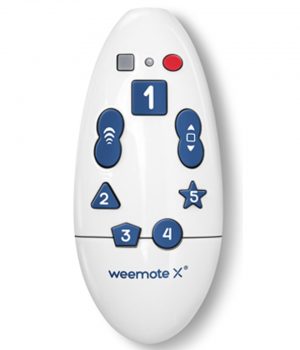
The Weemote Version 7 Making TV safer for your kids... The Weemote gives the parents the control
and the children the power.
- Control which channels your children can watch.
- Give your children their own remote.
- Simple alternative to complicated remotes.
- Ideal for Seniors with Alzheimer's or technically challenged adults.
Now Easier To Setup! The Weemote is a television remote control designed for young children. While offering simple controls for your child to operate, it also features the parental control to select only those channels you want your child to view. At the heart of the Weemote is the ability to program in up to ten channels of your
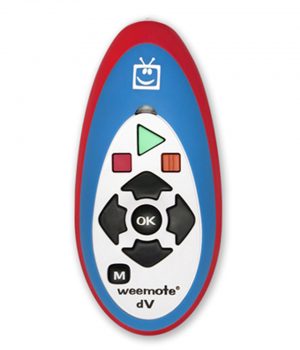
choosing. See the new weemote dV (Digital Video) remote. Designed to help your children control digital content. See more... "My children love The Weemote because it is the easiest way for them to
watch TV. With this controller I know I can leave the room unattended and know they are watching good TV programs. Thanks" - Tina McFall DESIGNED FOR YOUR KIDS
Each favorite channel has it's own unique shape and color. The Weemote also features a "safe channel surfing button" when pressed, only goes to the channels you have programmed. When using both a TV and a set-top box, one single
power button turns on both devices and sets everything up for reliable operation. With only nine user buttons, the Weemote offers a true, clutter free environment for young children. EASY TO SETUP We also made the Weemote easy to program and setup. A typical setup using the Weemote with a cable ready TV takes about five minutes. Select the channels and program in your TV or Set-Top
code and your ready to go. Step by step instructions as well as a Quick-start guide come with each unit. You can download and print the manuals by going to our Customer Support Page. MOST TV's AND SET-TOP BOXES ARE SUPPORTED
The Weemote has an extensive library of remote control codes to support all major brand televisions and Set-Top boxes. We refer to Set-Top boxes as cable boxes normally used when subscribed to a premium cable service or satellite boxes such as those provided by DirecTV, Primestar, Dish Network, etc. With the current digital Set-Top boxes supporting hundreds of channels, you can truly appreciate the
Weemote's ability to provide a select group of appropriate channels for your children. All Set-Top box configurations must be connected to the television using a standard antenna connection with the TV set to channel 3 or 4. See the System Requirements section on our customer support page if you would like further information on what systems the Weemote supports.
DESIGNED FOR PARENTS
The weemote features a parental program area that normally is secured and hidden from the child. This child friendly design exposes only the controls that they need to use, unlike standard remote controls that provide too many buttons for young children to operate. Both the parental setup area and battery
compartment are secured by screws. The Weemote uses two AAA batteries (not included) and uses very low power electronics for long battery life. Even in a low battery state, the Weemote can retain it's configuration for months. You can even replace the batteries and still be assured that your configuration is safe (within five hours). Weemote's Features: - Supports Major Brand TV's
- Supports Analog and Digital Cable Services
- Supports Satellite Receivers used with DirecTV, Dish Network and Echostar
- Supports 4-digit channel numbers
- Handles up to ten favorite channels (7 - 10 are available only through the channel up/down buttons)
- Supports TV/VCR Combination Units
- Supports Personal Video Recorders (Dishplayer, Replay and TiVo devices)
See the new weemote dV for complete control over Replay and TiVo devices. - Volume Option - For younger children, turn the volume control off completely
- Channel Up/Down Option - Turn off the Channel Up/Down Control completely
- Video TV Port - Select between channels 2,3,4,5 or a direct video input to your TV from a Set-Top device
- Home Channel Option - Set the Weemote to go to the first programmed channel when the child presses the power button.
- Optionally allow the channel up/down control to go to all channels. There are now three options for setting the channel up/down control; completely off, limited to only the favorite channels programmed and all channels accessible (adult or older child mode).
- Set-Top Powering Option - the ability to program the Weemote to turn on all necessary devices when pressing the power button. And the ability to only
send power signals to the TV.
Please Note: - Support for Personal Video Recorders allows for channel changing of live TV only. Does not allow access to recorded programming. See the weemote dV for use with DVR's and DVD players.
- The home channel option may not work in certain entertainment systems.
The home channel feature ensures that when the TV is turned on that the TV will be changed to first safe-programmed channel in the Weemote, i.e. the green #1 button.
- The volume option allows you to turn the volume control off in the Weemote, allowing you to set the desired volume level by the adult remote or front panel of the TV and/or Set-Top device.
- The channel up/down option is useful for children who are disabled and can
get easily confused between operating the dedicated channel buttons and channel up/down control.
- DIRECTV BRAND RECEIVERS
We have discovered a code compatibility issue with the latest series of DirecTV branded Satellite Receivers. Specific units involved are the DirecTV branded models D10, DVR80, DTC210 and HR10250. Currently, all product code version weemote's will not work with these devices. Please note that
this notice only involves the latest model DirecTV branded Satellite Receivers. Older models or those with a brand name printed on them like RCA, Philips, Samsung, etc. are not affected. - IR vs. RF
Some Satellite Set-Top receivers use RF/UHF radio signaling between the remote control and the Set-Top receiver. This allows a user to roam virtually
anywhere in their house, or point the remote in any direction and change channels. It also allows the Set-Top receiver to be hidden from view, i.e. behind a cabinet. If you are able to change channels on your Set-Top receiver from anywhere in your house and you notice a small antenna attached to your Set-Top receiver, then your unit is set to operate the Remote Control over radio frequency (RF/UHF) signals.
The Weemote uses standard Infrared Signaling (IR) to communicate with TV's
and Set-Top boxes. This signaling is also referred to as IR Remote Control. Most systems use IR communication between the Remote Control and the Satellite Set-Top receiver. IR communication requires that you point your remote directly at your Satellite Receiver and that you are within 15-30 feet of the unit.
If your system uses radio frequency (RF/UHF) signaling and has no MENU option for IR communication, then the Weemote will not work with your
Satellite Set-Top receiver. Two identified models using RF remote control is the Echostar Model 4000 receiver and the DirecTV D10 HD receiver using the RC-24 style remote control.
Please see our Frequently Asked Questions page for more information. Satisfaction Guaranteed If your not satisfied with Weemote, return to us within thirty days after delivery for a full refund of the purchase price not including shipping and handling. Warranty Weemote comes with a one year manufacturer's warranty on parts and labor. DirecTV and Primestar are registered trademarks of Hughes Electronics Corporation.
Dish Network is a registered trademark of Echostar Communications Corporation | |