
We have several resource to help you in setting up the TVGuardian.
- The TVGuardian Model 101 Manual (Acrobat Reader Required)
- For connecting the TVGuardian to multiple input devices see the
3-port Device Switch. - Other connection suggestions (see below)
- Contact TVGuardian Tech Support (see below)
- Online documents (see below)
TV Guardian Model 101 Basic Hookup
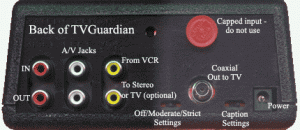


All necessary cables & instructions are included with the TVGuardian

- Plug the colored A/V cables into your VCR’s Audio & Video OUT.
- Plug the other end of the A/V cables into TVGuardian’s Audio & Video IN jacks (top jacks).
- Plug the (black) coaxial cable from the TVGuardian into your television’s ANT IN jack.
- Connect Power to TVGaurdian and plug into wall.
You are ready to go!
Trouble Shooting Items:
- Your VCR must be turned on for the TVGuardian to work.
- You will use your VCR as your tuner (channel changer).
- Your TV should be tuned to channel 3 or 4.
- When testing the TVGuardian, make sure you fast forward into the movie part of the video — the trailer and ads at the beginning are not closed captioned.
- Clean Videos & VCR heads will perform better with the TVGuardian.
- Check the TVGuardian Settings to make sure the TVGuardian is turned on.
- TVGuardian doesn’t work with “S-Video” connectors.
If all else fails, contact us.